MERCADO PAGO - Desktop & mobile
Product Catalog
Case
Problem
Context: Mercado Pago had a fragmented view of sellers, limited to the payment methods used. For SMEs, independent tools were no longer sufficient to sustain profitability and retention. Competitors offering management software show lower churn, helping merchants expand. Larger merchants also need integrated solutions to manage inventory, workforce and tax complexity.
Business objective: The strategy is to move up market, acquiring and retaining larger merchants and corporate accounts. The goal is to become the main financial partner, enabling business growth through integrated technology. This should increase market share and engagement across the ecosystem, reinforcing differentiation and reducing competitive risk.
Solution: Create a management software (SWE) that offers a 360° view of the business, consolidating Mercado Pago transactions with cash sales and sales from other acquirers. The platform offers end-to-end control with POS, catalog and inventory management (including bulk product uploads), invoicing and a Financial Hub for tracking cash flow and performance. Adoption is accelerated with the "Selling Coach", an onboarding experience that guides initial setup and first critical tasks.
My role: I worked as Sr. UX Designer partnering with the product manager, technical and project leads in defining features and was responsible for the end-to-end user experience, including navigation flows and interface design.
Process
Understanding users and their needs
How SMEs operate: The routine of small and medium enterprise sellers is intense and generally owner-centered, with lean operations (up to 10 employees, usually in one store), mainly in-person but increasingly hybrid through social media and online sales. When it comes to customer service, the priority is to sell quickly (search by name/code) and in many cases negotiate prices, requiring system flexibility. To receive payments, they use multiple card machines to optimize rates and only consult them for the daily basics.
The daily needs of a seller in their business
- Billing flows: Ease and simplicity in using billing tools
- Financial management: Consolidate all payments, efficiently manage cash flow, adopt savings and planning strategies and tools, and have access to credit cards and lines of credit.
- Business management: A comprehensive overview and management of your business: sales, invoicing, products and inventory, cash flow, suppliers, HR, customers and information.
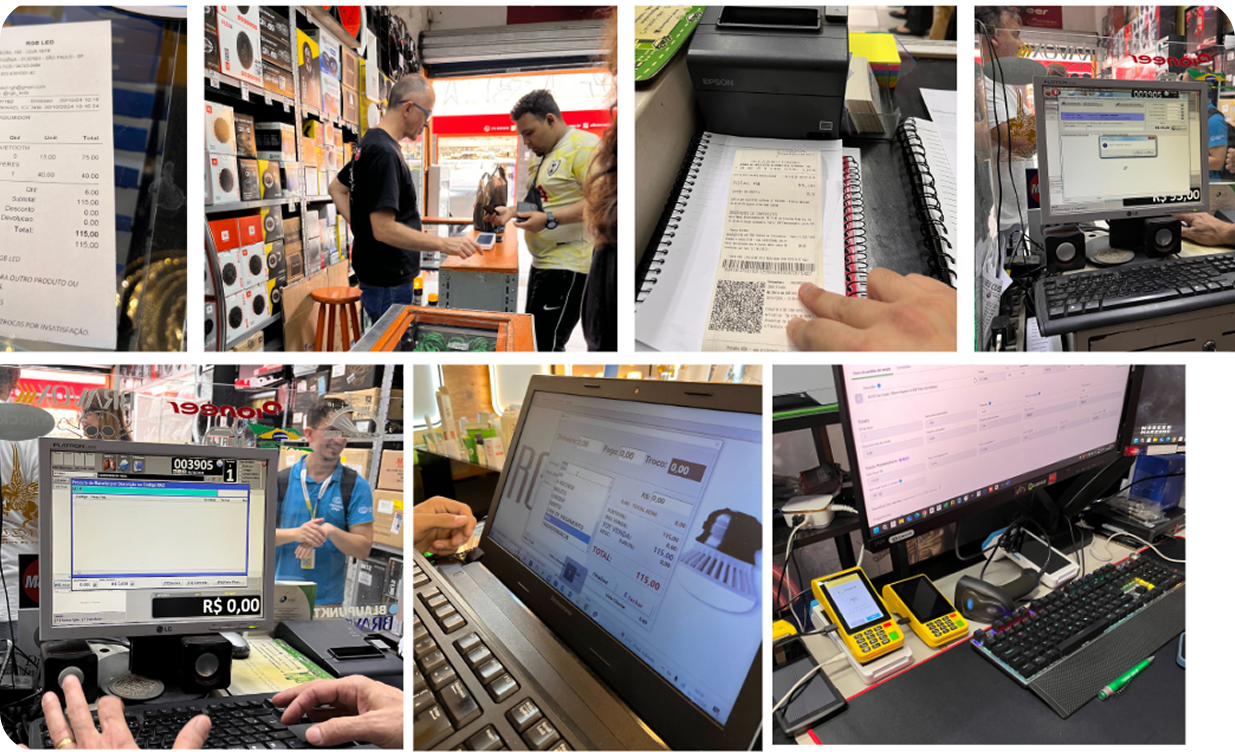
Our products and inventory tool
Analysis
Initial scenario: We identified that the tools available to Mercado Pago customers were based on experiences developed for profiles different from our Marketup strategy. The tools were geared towards online marketplace sales and therefore we needed to thoroughly analyze new features, information architecture and task flows that best served our users.
Opportunities found
- The category field is optional for Mercado Pago, as not all merchants use categories in managing their products.
- 28% of users could not find the category for their product.
- To add a single product, it was necessary to follow three steps with at least eight clicks.
- There were too many cards, titles and descriptions.
- The space for pending "alerts" took up too much screen space and was disconnected from the list.
- According to the analyzed metrics, only 27% of sellers created items with categories in the last three months. Therefore, this space could be better used with a feature that serves a larger number of users.
- The modal filter format takes the user away from the main page flow, creating a more intrusive and less fluid experience.
- The product is displayed in card format and there is a large white space, which could be better used to organize items and actionable information.
- Mass actions could be displayed only after an initial user selection to avoid cognitive overload.
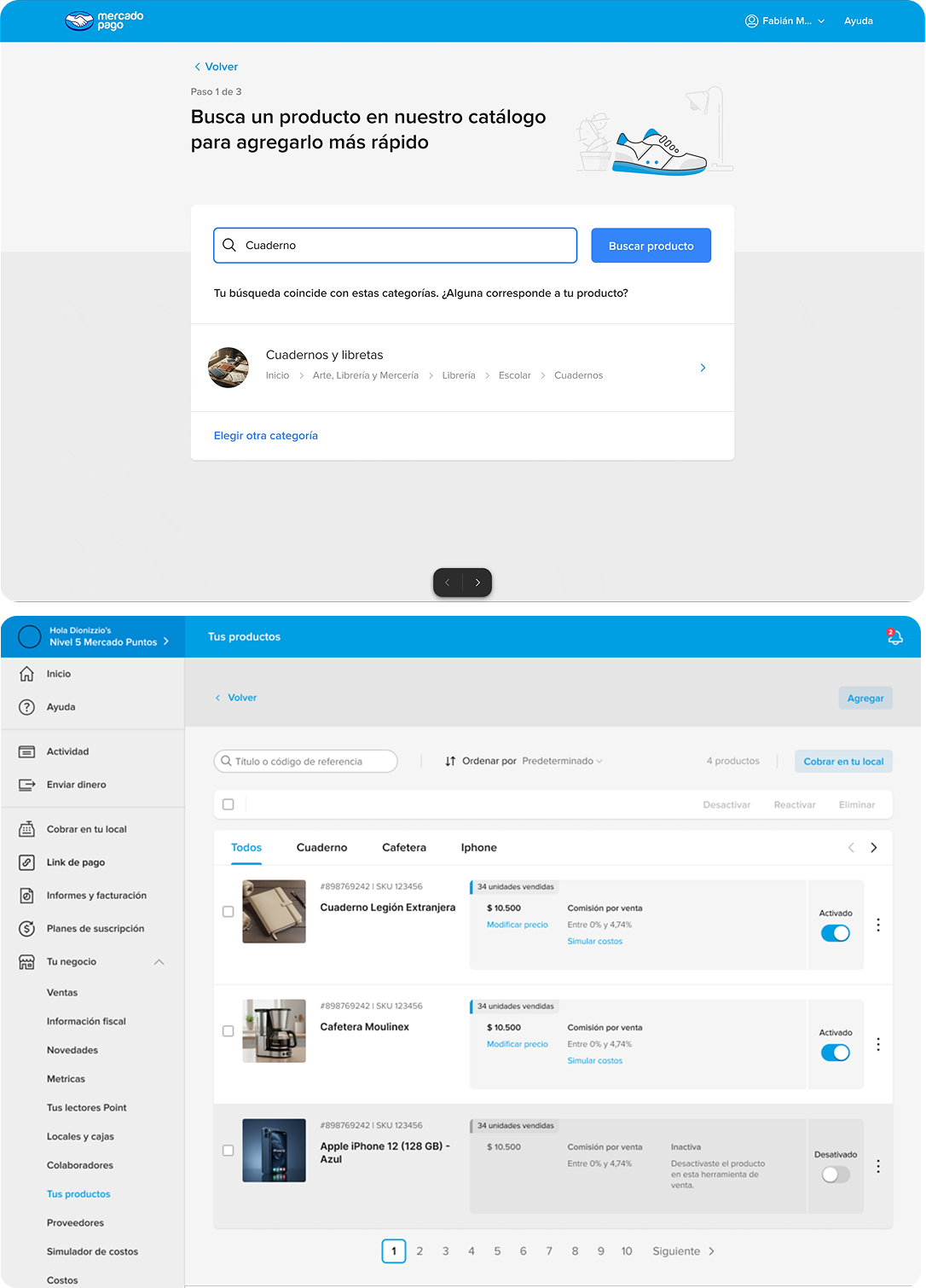
Redesigning the experiences
Craft
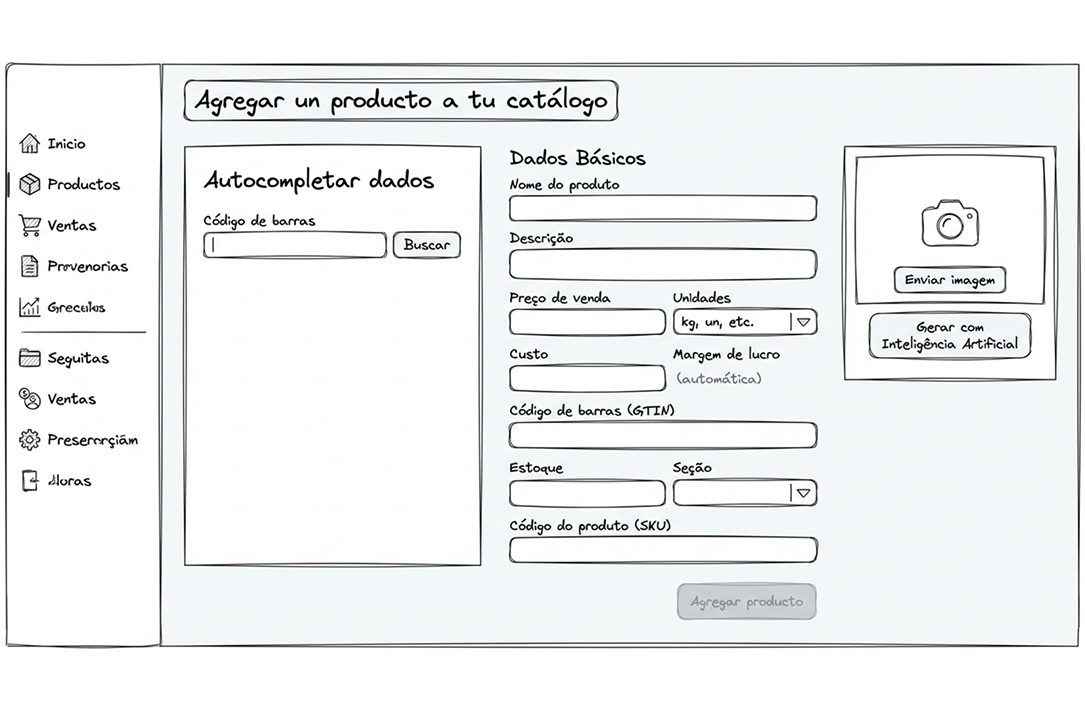
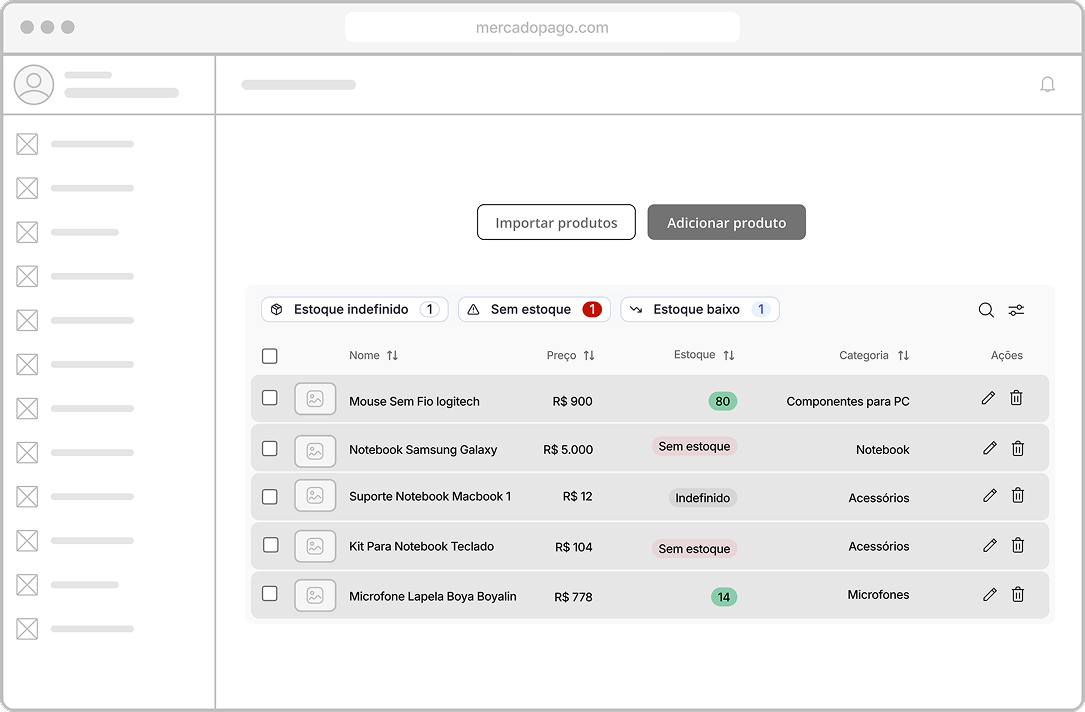
- I created wireframes and low-fidelity prototypes to explore different solutions and gather initial stakeholder feedback.
LAYER 1: Add product
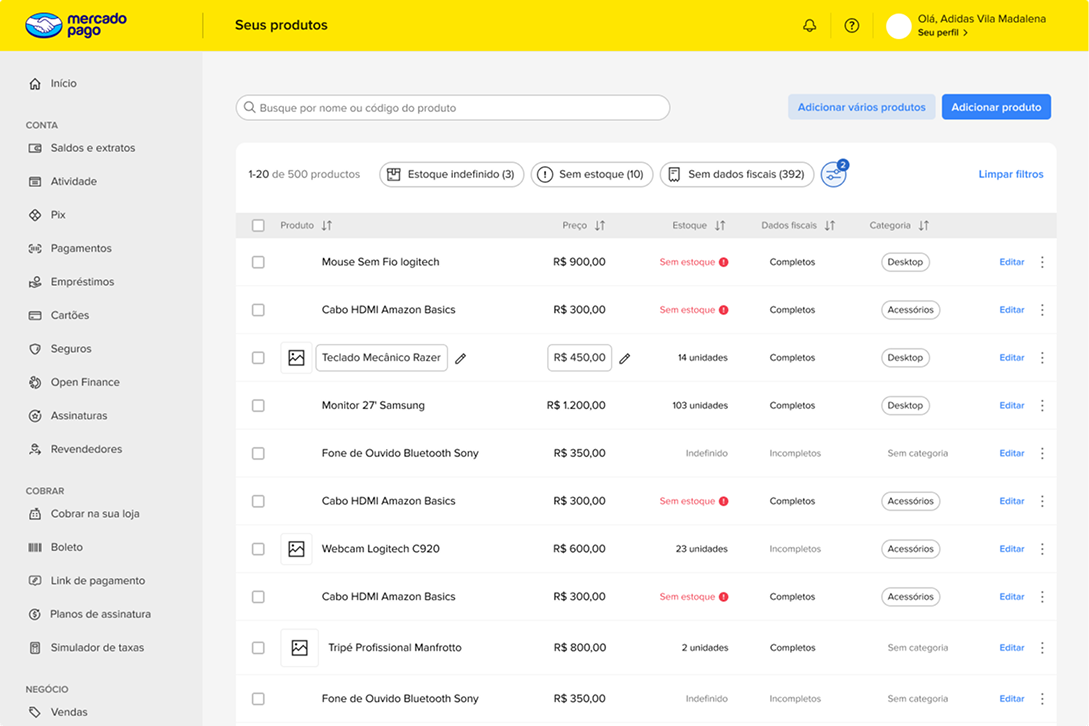
LAYER 2: Product list / mass actions
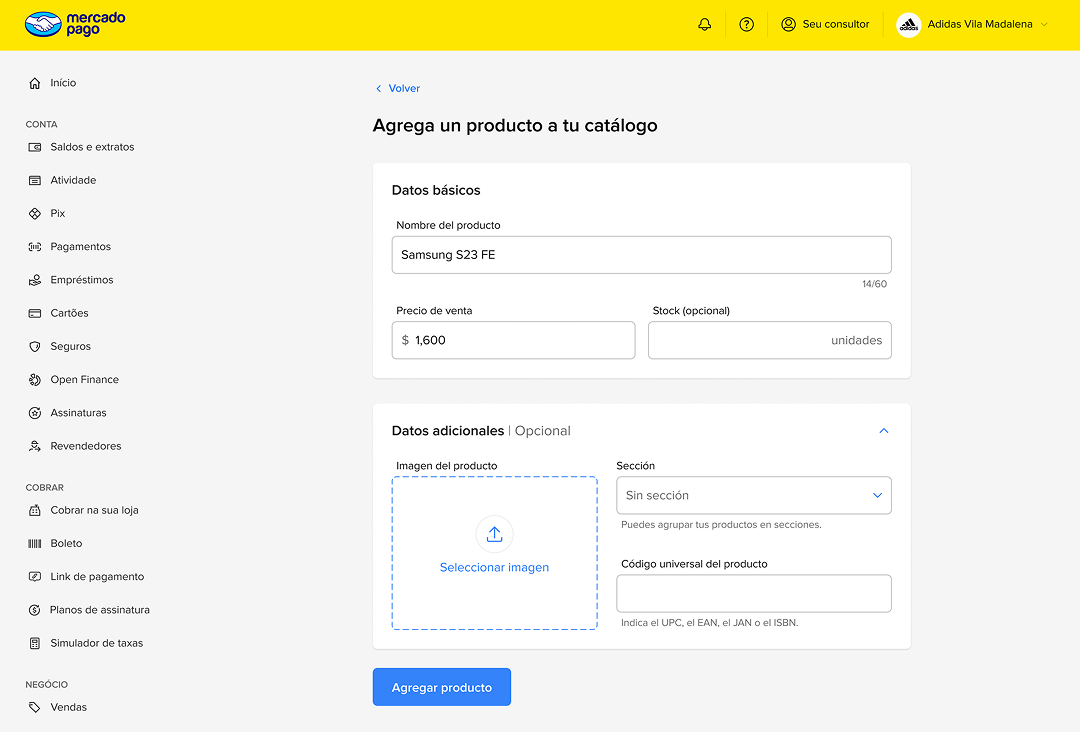
- After some internal feedback we started working in medium fidelity using our design system resources
LAYER 1: Add product
LAYER 2: Product list / mass actions
Final solution
Applied improvements
- AI auto-fill from Gtin (barcode)
- We removed the requirement to fill in the product category.
- We reduced the form to a single screen.
- We restructured the form with information SME users need to manage a store
- Unit of measure: kg, Liter, Meters, Unit
- Cost price
- Profit margin
- Stock and minimum stock alert
LAYER 1: Add product
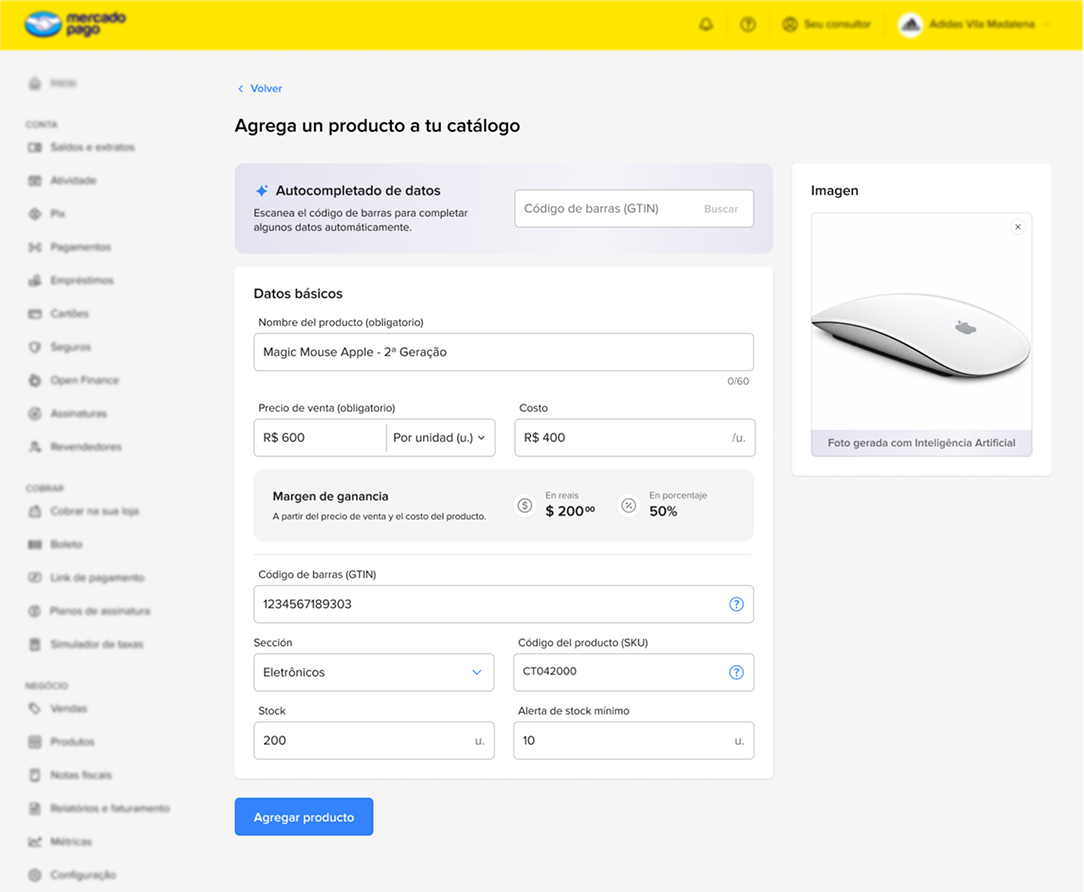
Applied improvements
- The pending items area was reorganized into tabs that segment products, allowing a simpler and more direct view, linked directly to the list without occupying as much space or diverting screen attention.
- Item visualization that visually resembles a table, a format already known and used by most sellers. The format also helps visualize more items at once, aiding comparison and management.
- As the filter includes the option for the tax data status, these were added to the table, improving the invoicing functionality.
- To avoid overload, edit and delete options are only shown when hovering over the row.
LAYER 2: Product list / mass actions
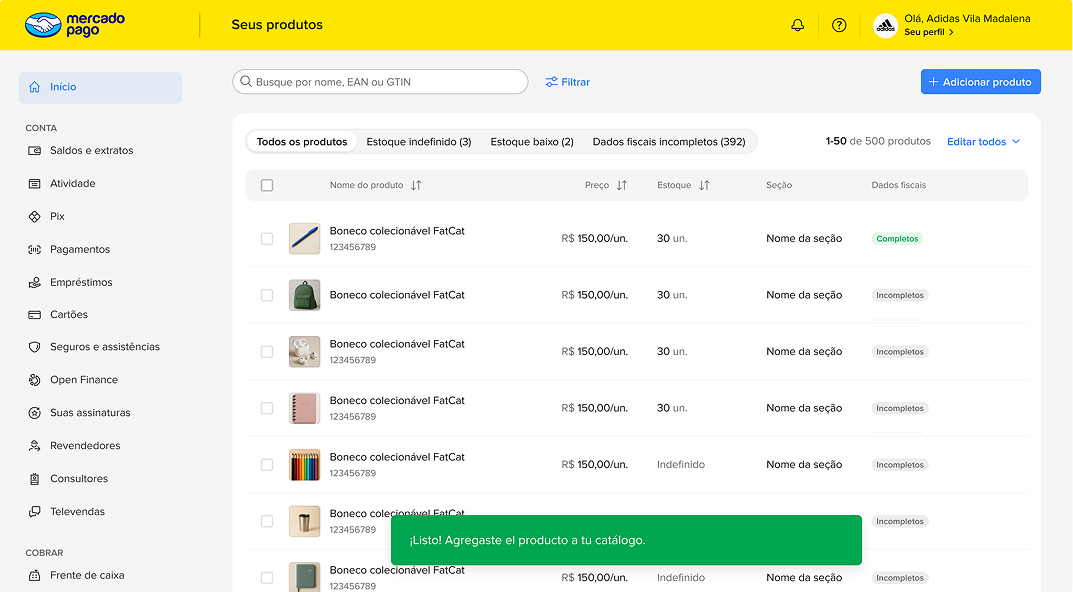
Results and metrics
Increase in conversion rates
The abandonment rate dropped from 70% to 55%.
+15%
Reduction in add product flow time
From 143 seconds to 55 seconds.
-61%
Products added to catalog per seller
Increase from 2.5 to 3 products
+17%
Quant Seller
14/04
Implementation
19/05
Quant Seller
14/04
Implementation
19/05
After launch in Brazil and Mexico, we doubled the number of sellers using the Mercado Pago Catalog
Designers on the project

Luiz Felipe Nepomuceno
Sr. UX Designer

Gabriel Gonzaga
Project Lead Designer

Luiza Alexander
Semi Sr. UX Designer

Soraia Shell
Semi Sr. UX Writer